Work types the way you count them
Set your own name, coefficient and hourly rate for each work type — regular, overtime, half day, or whatever your workplace calls it.
Define your own work types, coefficients and rates, then log each day — or create an organisation and run the whole team: logging, reconciliation, printable work slips. Totals follow your real pay period. No spreadsheets, no home-made formulas.
Free. Your attendance data is yours — delete it whenever you want.
Two modes, one account Track my own work Manage a whole team
Three steps — set up once, then it is one tap a day.
Give each type a name, a coefficient and an hourly rate. Five common ones are there already, ready to adjust.
Pick the day, pick the type, done. Worked two types in one day? Log it twice, each with its own hours and note.
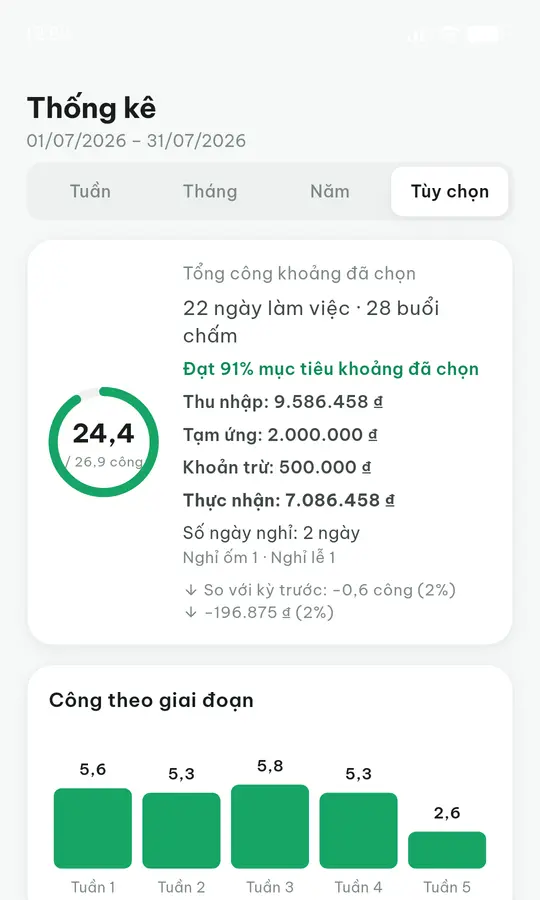
Total units, hours, days and income for the current pay period — recalculated the moment you log anything.
The six things you do most often, and nothing you do not need.
Set your own name, coefficient and hourly rate for each work type — regular, overtime, half day, or whatever your workplace calls it.
Regular hours in the morning, overtime in the afternoon — record each one separately with its hours and a note, instead of merging them into one line.
Does your workplace close the month on the 25th? Statistics run from the 26th of last month to the 25th of this one, not the calendar month.
Add lunch or travel allowances, or deduct an advance — applied straight to the period income instead of worked out on the side.
Export a work slip as PDF to send to your workplace, or a CSV to open in Excel when you need to cross-check.
The Android app stores data on the device, so basements and workshops are fine; it syncs once you are back online.
Every trade gets attendance wrong in a different place. Here is that place, and the thing in the app that answers it.
Every site has its own rate, and a worker on this site today is on another one tomorrow.
Keep a list of sites, set a rate per site × per person, and filter the team timesheet by site.
Day shift, night shift, overtime — each with its own coefficient, and the period total has to come out right.
Define your own work types with a coefficient and hourly rate; log a day more than once, each entry with its own hours.
Staff on odd shifts, half days, someone swapping mid-shift.
Log several entries in one day, each with its own work type, hours and note so you can reconcile it later.
Pay is a fixed monthly amount — what you need to track is days absent, not days worked.
Put those people on the monthly-salary model; absences are marked explicitly rather than inferred from an empty cell.
You keep your own tally and reconcile with the boss at month end — and it rarely matches, because there are two books.
Export a PDF work slip with the work units, hours, deductions and net pay, so both sides read and sign the same sheet.
Pay has to be right, without the whole office seeing what each person earns.
The Accountant role can see and record money; the Manager role can log attendance but sees no money anywhere.
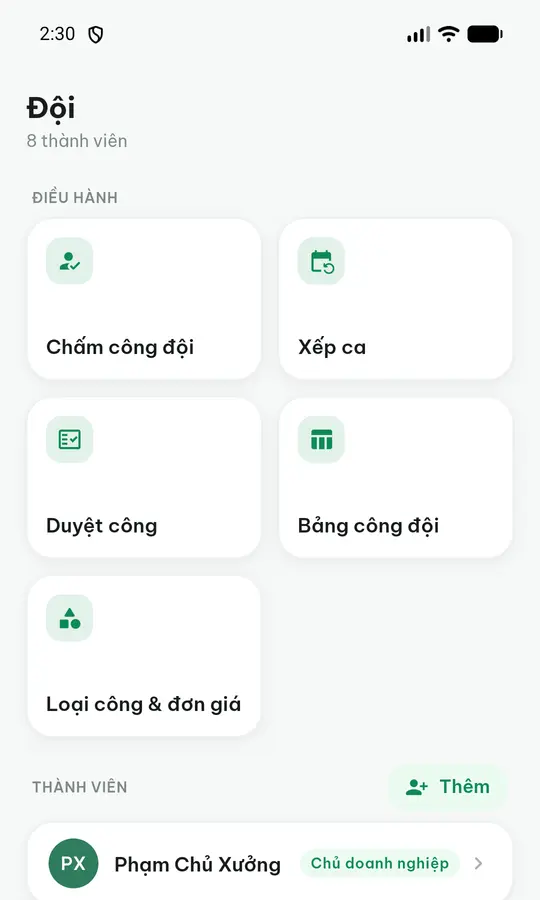
Create an organisation, invite people by code, QR or link, then decide who can do what. Owner and Manager log work for the team, the Accountant handles money, staff see their own record — and every change is written to the activity log.
Owner and Manager add, edit and delete entries on behalf of each person. An Owner editing an entry must give a reason.
The whole period on one grid: a row per person, a column per day, with totals for work units and income. Export as CSV for Excel.
Owner, Manager, Accountant, Staff. A Manager can log attendance but sees no money anywhere in the product.
Set the cut-off day once for the whole organisation — the 25th, say — instead of each person running a different period.
Piece rate by work unit, or a fixed monthly salary with absences marked separately. Each person is on one model.
A list of workplaces, a rate per workplace × per person, and a workplace filter on the team timesheet.
Record advances and deductions within the period; the work slip shows net pay directly instead of you computing it on the side.
Print a slip for each person — including people with no account — so both sides sign the same sheet at reconciliation.
Who changed which entry, when, and why. Staff can read the lines about themselves too.
Close the books once a period is paid: the numbers are snapshotted and every write into that period is blocked until you unlock it.
This data is your income — so this is the part we spell out most clearly.
Fully usable without signing in, with data kept on your device. Sign in only if you want it synced.
Signing in from a device you have never used needs an OTP sent by email, even with the right password.
Turn it on in Settings so nobody who picks up your phone can open your records.
Do it yourself in the app, or send a request through the account deletion page.
One account, one set of data.
Open a browser and it works, nothing to install. This is also where the organisation side lives: the team timesheet, reconciliation, work slips and period locking.
Works with no connection — data is stored on the device, sign in later if you want to sync. Fastest place to log your own work. The mobile app is in testing.
The things people ask most before signing up.
No. Logging, statistics and data export are all free, there is no cap on the days you log, and there are no ads.
Yes. Create an organisation and invite people in; Owner and Manager log work on behalf of each person and read the whole period on one person × day grid. Staff can still log their own work if you prefer that.
No. The Manager role can log attendance and manage staff, but rates, income and every money field are absent from that role’s screens. If you want someone else handling money, give them the Accountant role.
They still get tracked: an Owner or Manager adds them to the roster and logs on their behalf, with nothing for them to sign up for. At period end, print their work slip on paper for both sides to sign.
Put that person on the monthly-salary model. You then do not log each day worked; what you record is days absent, and an absence is marked explicitly rather than inferred from an empty cell — so nobody loses pay because someone forgot to tick a day.
Yes. Set your pay-period cut-off in Settings and statistics follow it — for example the 26th of last month to the 25th of this one — rather than the calendar month. For an organisation the cut-off is set once for everyone, not per person.
The Android app works normally offline because data is stored on the device, then syncs when you are back online. The web version needs a connection, since its data lives on the server so you can open it from any machine.
Yes. You choose the name, coefficient, colour and hourly rate for each work type, so "night shift", "day rate" or whatever your workplace calls it all work.
Three things: the activity log records who changed which entry and why; the printed work slip is signed by both sides; and locking a period snapshots the numbers and blocks any further write into it until it is unlocked.
You do not build the formulas and they do not break when you add a row: pay periods, coefficients, per-site rates, allowances and net pay are already there. When you do want a spreadsheet, export CSV to Excel at any time — so you lose nothing you have today.
Not yet. There is the web version, which works on any machine including Safari on iPhone, and the Android app on Google Play. We will announce the iOS release when it ships.
Log work right on your own device — it works with no connection and syncs when you are back online. Same account as the web version.
On an iPhone or iPad?
The web version runs every feature right in Safari — nothing to install. To get an app-like icon: open this page in Safari, tap Share, then “Add to Home Screen”.
The Android build is in testing. There is no iOS build yet — in the meantime the web version works fully on any device.